
Find your
lost tenths
Drop in your DJI, GoPro or MyChron session. Combat Data finds every corner, shows where you lose time and tells you what to change on the next lap. Your video never leaves your computer.
Drive. Drop. Debrief.
No install, no track setup, no lining up timestamps by hand.
Drop in the original files
Straight off the SD card, or your MyChron .xrk. A 6–9 GB video is read in seconds — only the GPS track inside it, nothing is uploaded.
Paste the timing sheet (optional)
Paste a screenshot and it is read for you. Start/finish and every lap are lined up with the official timing, to about a tenth.
Get your coaching
How much time each corner costs, why, and what to change — with one click to that moment in the video.
Not just charts. Coaching.
Other tools hand you lines. Combat Data tells you what they mean.
Where the time went — and why
Every lap is compared with your best one. The corners that cost the most are named, with the reason spelled out.
- Brake point in metres, entry / apex / exit speed
- Brake, lift or flat out — detected, and you can override it
- One click to that moment in the video


Lap times you can trust
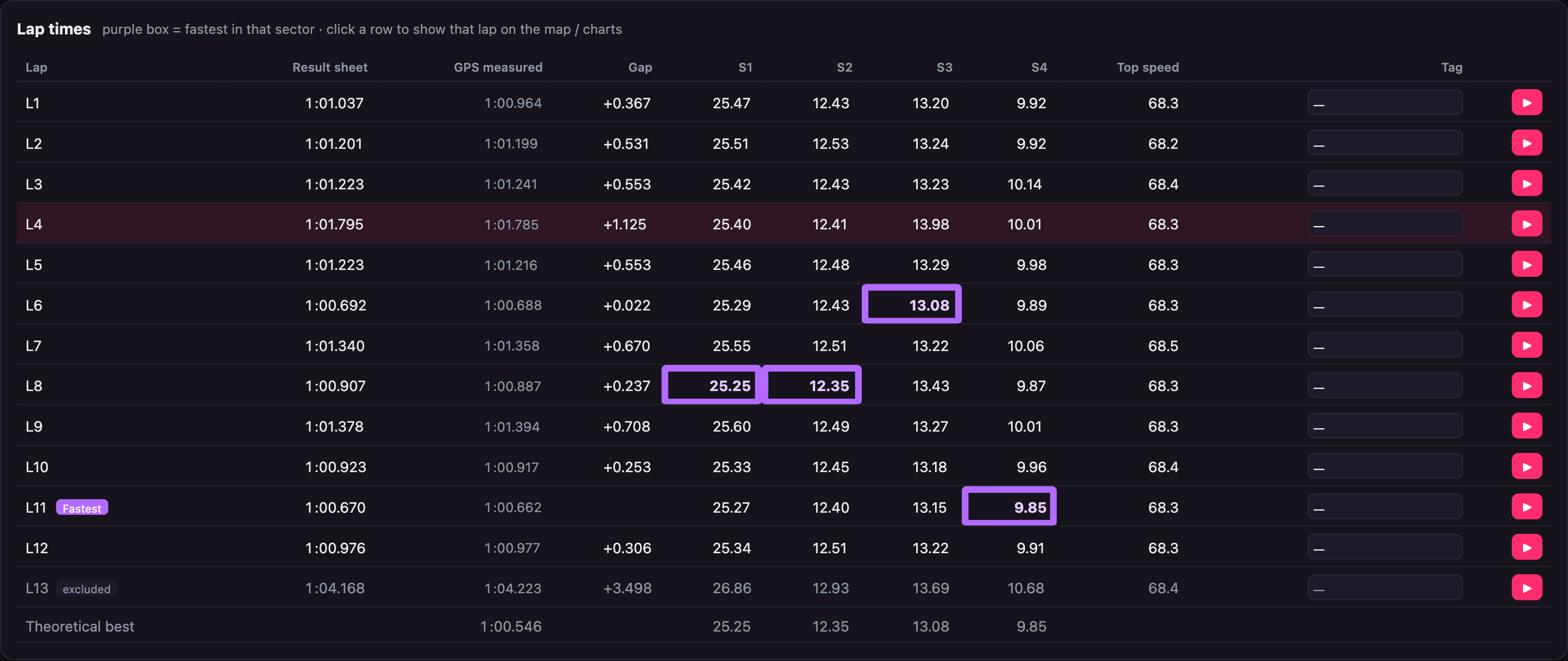
GPS-only lap timing is often out by 0.2–0.5 s. Combat Data locks onto the timing sheet, so sectors and your theoretical best actually mean something.
- Linked corners grouped into sectors automatically
- Theoretical best from your own best sectors
- Tag traffic or spins so they don't count
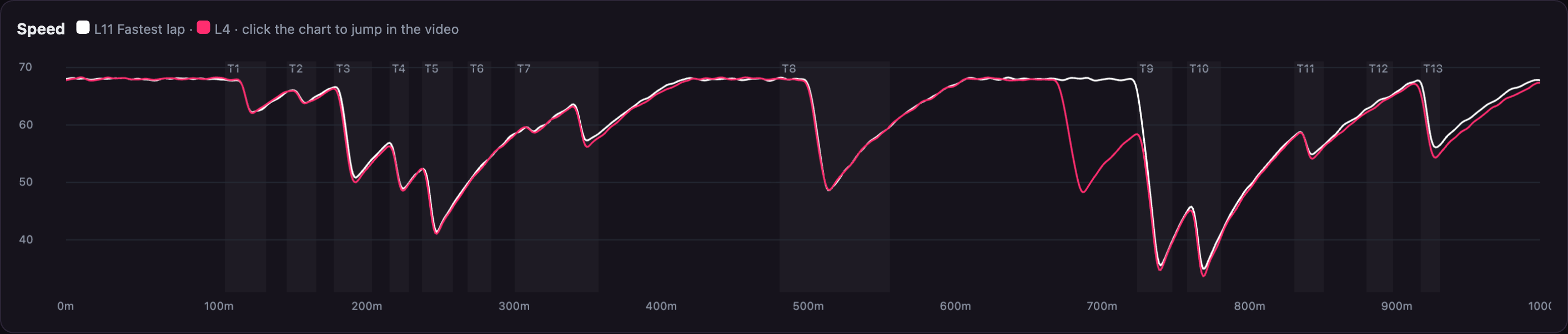
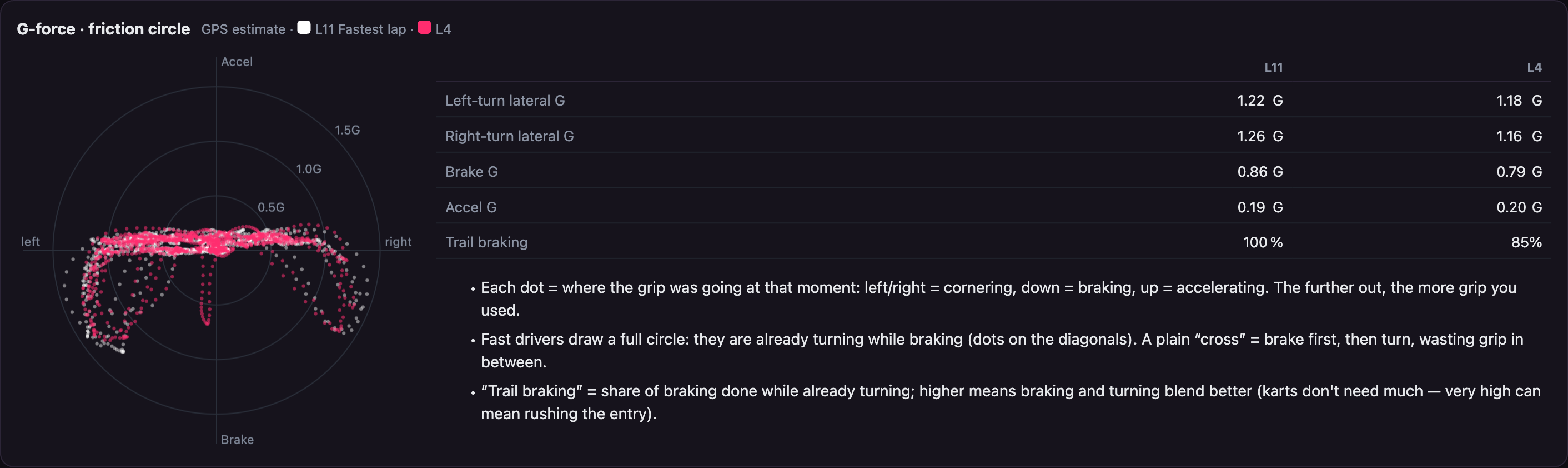
Speed, G-force & the friction circle
See how much grip you are really using — whether braking and turning blend, and where there is margin left.
- Overlay any two laps
- RPM, water and exhaust temperature from MyChron
- Weather at the time of the session, automatically
F1-style racing line
Each corner coloured purple, green, yellow or red against your records — plus an ideal line built from your best runs.
Synced lap compare
Two onboard videos synced by track position — even laps from different days.
Long-term progress
Finds the mistake you make every session and gives you one or two things to work on next time.
Private by design
Videos are read inside your browser and never uploaded.
Phone briefing
Your corner targets and focus points on your phone before the session — works offline.
English & 中文
The whole app switches between English and Chinese.
Built for kart drivers
| Combat Data | Cloud video apps | Lap-timer apps | |
|---|---|---|---|
| Video never uploaded | ✓ | — | ✓ |
| Laps matched to the official timing sheet | ✓ | — | — |
| Corner-by-corner coaching (brake point, target speed) | ✓ | Some | — |
| Racing line, ideal line, F1 colours | ✓ | Some | Some |
| MyChron / AiM data | ✓ | Some | Some |
| Long-term progress & focus points | ✓ | — | — |
Now in closed beta
Free while we test. Planned launch pricing below.
Closed beta
- Every feature
- DJI / GoPro / MyChron
- Direct line to the team
Driver
- Unlimited sessions
- Coaching, racing lines, lap compare
- Long-term progress & phone briefing
- Cloud records (coming)
Coach partner
- Your own referral code
- A share of every student subscription
- See your students' sessions (coming)
Launch prices may change.
Questions
Do you upload my video?
No. The video is read inside your browser and only the GPS track is taken from it. Even a 6–9 GB file takes seconds.
What do I need?
A camera that records GPS: DJI Osmo Action 4 / 5 with the GPS remote, or GoPro HERO 9–11 / 13 (the HERO 12 has no GPS). MyChron 5 / 6 data works too, with or without video.
Do I need the timing sheet?
No — laps are found from GPS. With a timing sheet (or a MyChron) lap times are more accurate.
Mac, Windows, phone?
Mac and Windows in Chrome or Edge, nothing to install. Phones get the pre-session briefing; full analysis is best on a computer.
Which tracks?
Any track. The first time you visit, corners are found automatically and remembered.
Want in early?
We are looking for drivers and coaches with a GPS camera or a MyChron to test with us. Get in touch and we'll send you an invite.
Request beta access